How villa managers should prepare monthly owner statements
The owner statement is often the only part of your work a villa owner sees every month. A clear, consistent statement builds trust. A confusing one creates questions, even when the numbers are right.
What owners want to know
Most owners do not live near their villa. They want to know three things: how much the villa earned, where the money went, and how much they receive. A good statement answers those three questions on the first page, and gives the detail behind them on the next.
Consistency matters more than design. Use the same layout, the same order of lines and the same calculation every month, so the owner can compare months without calling you.
Timing matters as well. Agree a fixed date on which owners receive their statement and payout, for example by the tenth of the following month, and stick to it. Owners plan around that date. A statement that arrives late, even with correct numbers, makes owners wonder whether something is wrong.
The lines every statement should have
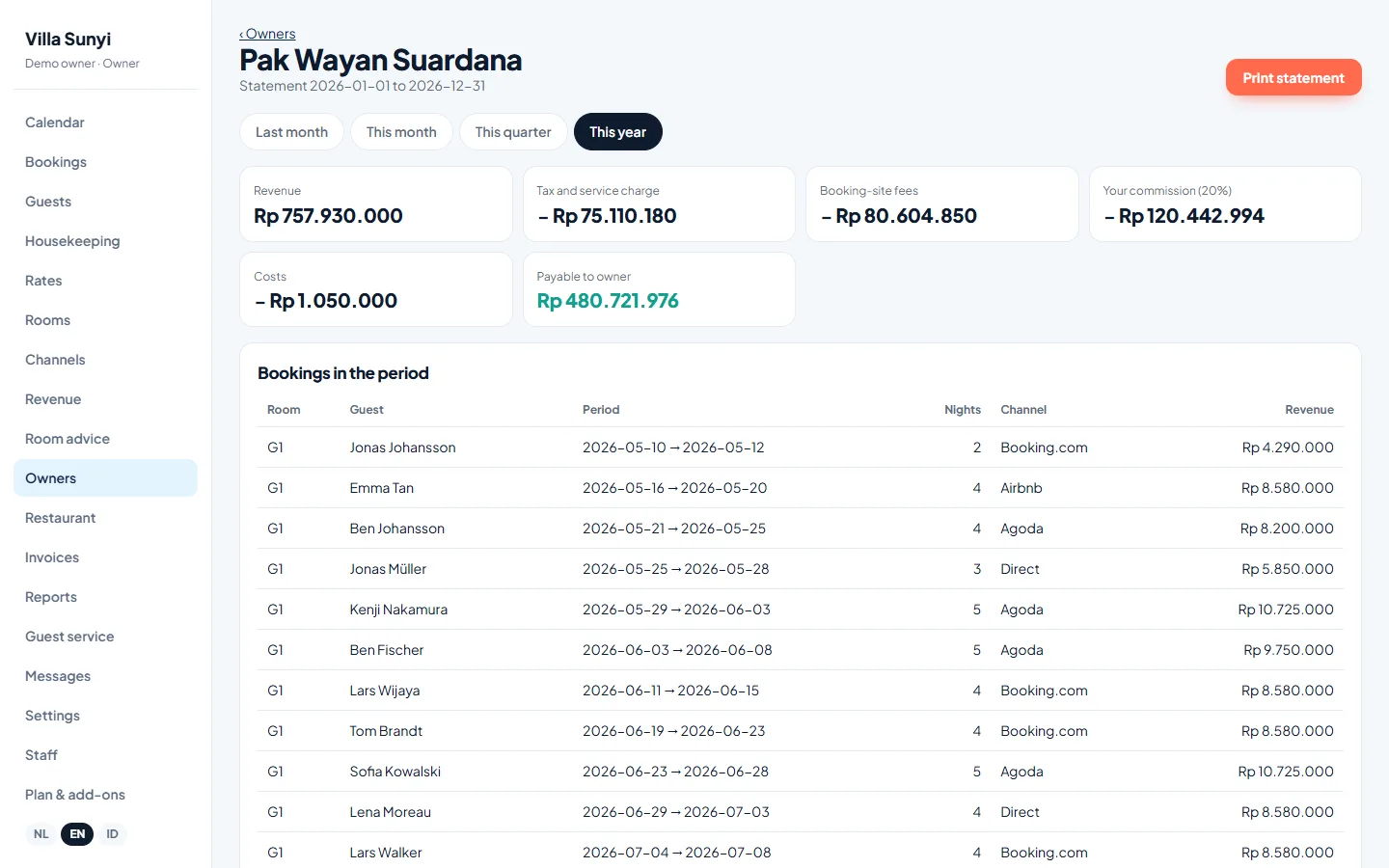
- Bookings and gross revenue. Each booking in the month with guest name or reference, dates, number of nights, channel and the amount paid by the guest.
- OTA fees. The commission or service fee for each booking from Booking.com, Airbnb, Agoda or other channels, so the owner sees what distribution cost.
- Taxes. Hotel tax and any other taxes collected or paid on the revenue, as agreed with your accountant.
- Management commission. Your fee, with the percentage and the amount it was calculated on clearly stated.
- Operating costs. Cleaning, laundry, electricity, water, internet, pool and garden maintenance, repairs and supplies, each with a short description.
- Payout. The amount transferred to the owner, the date and the bank reference.
- Occupancy summary. Nights booked, nights available, occupancy and average nightly rate. Owners like to see how their villa performs, not only what it paid.
Agree the calculation once
Most disputes come from unclear agreements, not wrong numbers. Before the first statement, agree with the owner in writing: is your commission calculated on gross revenue or on revenue after OTA fees? Are taxes deducted before or after your commission? Which costs does the owner pay, and which are included in your fee? Which month does a booking belong to, the booking month or the stay month?
Most managers use the stay month, so a booking made in March for a stay in July appears on the July statement. Bookings that cross the end of a month can be split by nights, as long as you do it the same way every time.
Currency is another point to settle. Many owners live abroad and think in dollars, euros or Australian dollars, while revenue and costs in Bali are in rupiah. Keep the statement in rupiah, since that is the currency the money was earned and spent in, and if the owner wants a converted figure, state the exchange rate and the date you used.
Save time with the right tools
Building statements in a spreadsheet works for one or two villas, but with more owners the monthly copying of bookings, fees and receipts takes days. Statements built directly from the booking calendar are faster and contain fewer mistakes, because the bookings and channel fees are already there.
Sojodesk has an owner statement add-on for villa managers that shows revenue, OTA costs, tax, management commission, costs and the payout per owner, in a printable format. Whatever you use, attach receipts for larger costs and keep a copy of every statement you send.
Questions from villa managers
Should I send statements monthly or quarterly?
Monthly is the norm for rental villas and helps owners follow their income. Quarterly can work for owners with a fixed rental agreement rather than a revenue share.
How do I show a cancellation with a fee?
List it as a separate line with the amount kept, the related OTA fee if any, and the resulting revenue, so the owner understands why money came in without a stay.
What if a big repair is needed?
Agree a spending limit above which you ask the owner first. On the statement, describe the repair, attach the invoice and note the owner's approval.
See Sojodesk with your own rooms
Tell us about your property and we will set up a demo with your room types, rates and channels.
Request a demo